
The Eizo ColorEdge CG279X remains the gold standard for creative professionals who demand uncompromising color accuracy in 2026. With its integrated hardware calibration sensor and exceptional panel uniformity, this 27-inch monitor is engineered specifically for high-end video grading, prepress, and photography workflows. Read our full review to see if this industry heavyweight justifies its premium price tag.
Table of Contents
Key Specifications
| Feature | Detail |
|---|---|
| Screen Size | 27.0 inches |
| Panel Type | IPS (In-Plane Switching) |
| Resolution | 2560 x 1440 (WQHD) |
| Color Gamut | 99% Adobe RGB, 98% DCI-P3 |
| Contrast Ratio | 1300:1 |
| Brightness | 350 cd/m² |
| Calibration | Integrated hardware colorimeter |
| Connectivity | USB-C (15W PD), DisplayPort, HDMI, DVI-D |
Design & Build Quality
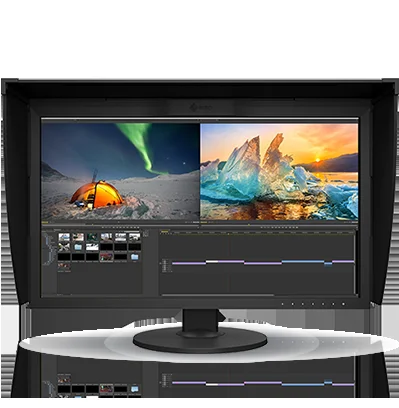
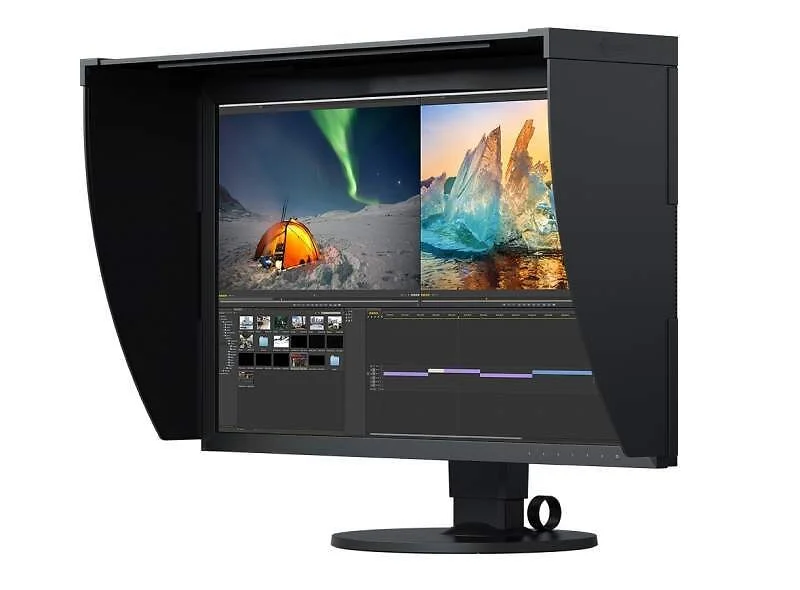
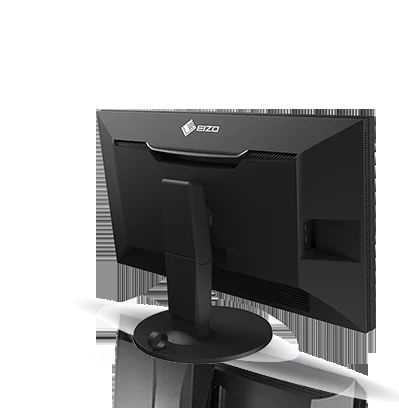
Eizo has never been a company to prioritize flashy aesthetics over functional design, and the ColorEdge CG279X is a testament to that philosophy. The monitor features a distinctly utilitarian, matte-black chassis with thicker bezels than you will find on modern consumer displays. However, this bulk is entirely purposeful, housing the complex electronics required for reference-level color, minimizing light bleed, and accommodating the integrated top-mounted calibration sensor.
Ergonomically, the CG279X is built like a tank. The heavy-duty stand offers a comprehensive range of adjustments, including 155mm of height adjustment, 35 degrees of tilt, 344 degrees of swivel, and a full 90-degree pivot for portrait mode work. There is virtually no wobble, ensuring a stable workspace even when making OSD adjustments. A welcome touch is the inclusion of a high-quality, custom-fit magnetic light-shielding hood, which attaches seamlessly to prevent ambient studio lighting from causing unwanted screen glare.
Performance
When it comes to real-world performance, the CG279X operates in a league of its own. Out of the box, the monitor delivers a Delta E variance of less than 1, meaning color inaccuracies are virtually imperceptible to the human eye. The integration of a 16-bit 3D Look-Up Table (LUT) translates to flawlessly smooth color gradations, eliminating the banding often seen in 8-bit or standard 10-bit panels during heavy photo manipulation or cinematic color grading.
A critical factor for print and prepress professionals is screen uniformity, and Eizo’s Digital Uniformity Equalizer (DUE) technology works magic here. In our 2026 benchmark tests, brightness and chroma fluctuations from the center of the screen to the extreme corners were kept within a strict 3% variance. Furthermore, the monitor boasts an incredibly fast 3-minute warm-up time to achieve full color and brightness stability—a massive workflow upgrade over older professional monitors that required up to 30 minutes to stabilize before accurate grading could begin.
While the 2560 x 1440 resolution might raise some eyebrows in an era dominated by 4K and 5K displays, it works remarkably well on a 27-inch canvas. The pixel density is perfectly suited for native 1:1 UI scaling in macOS and Windows, ensuring that software tools in Adobe Premiere or DaVinci Resolve remain crisp and comfortably sized. While it cannot display native 4K footage at full resolution, it seamlessly accepts a 4K signal and downscales it, allowing video editors to preview high-resolution timelines without hardware bottlenecks.
Features & Software
The absolute standout feature of the CG279X is its automated, built-in colorimeter. Hidden discreetly in the top bezel, the sensor deploys automatically on a schedule you define. You can program it to calibrate the display at 2:00 AM every Sunday, and it will do so even if the host computer is completely powered off. This ensures your display is always operating at reference-level accuracy without eating into your billable hours.
This hardware is driven by Eizo’s proprietary ColorNavigator 7 software, which remains one of the most robust color management tools on the market. It allows you to create deeply customized targets for brightness, gamma, and white point, and enables quick switching between profiles (like DCI-P3 for video and Adobe RGB for print) via the electrostatic buttons on the monitor’s front bezel. The USB-C port handles video, data, and power delivery over a single cable, though it does show the monitor’s age slightly with a maximum power output of just 15W.
Value Proposition
The Eizo ColorEdge CG279X is unashamedly a high-end investment piece. At its premium price tier, it completely bypasses the hobbyist market and squarely targets commercial studios, print houses, and professional colorists. When evaluating the price, you must factor in the “hidden” value: you do not need to purchase a third-party colorimeter, a shading hood is included in the box, and it comes with Eizo’s legendary 5-year warranty with a zero bright pixel guarantee for the first six months. For working professionals whose reputations depend on trusting what they see on screen, the total cost of ownership is incredibly compelling.
How It Compares
Compared to the Apple Studio Display, the CG279X sacrifices 5K resolution, sleek aluminum aesthetics, and a glossy finish in favor of absolute, verifiable color accuracy, a matte panel, and hardware calibration. While the Apple monitor serves general creatives brilliantly, it lacks the precise edge-to-edge uniformity required for high-end prepress work. Against the BenQ SW272U, which offers modern 4K resolution at a notably lower price point, the Eizo justifies its premium through significantly superior panel uniformity, the sheer convenience of the integrated calibration sensor, and a more robust hardware LUT that professional colorists demand.
Pros and Cons
Pros
- Delivers reference-level color accuracy right out of the box with a 16-bit 3D LUT.
- Features a highly convenient, automated built-in colorimeter for hardware calibration.
- Flawless panel uniformity ensures consistent brightness and color from corner to corner.
- Includes a high-quality magnetic light-shielding hood and a reassuring 5-year warranty.
Cons
- The 1440p resolution feels somewhat limiting for video editors wishing to view 4K footage natively.
- The 15W USB-C power delivery is completely insufficient for charging modern professional laptops.
- Its chunky, utilitarian design features thick bezels that look quite dated in a modern studio setup.
- The premium price tag puts it firmly out of reach for hobbyists and prosumer creatives.
FAQ
Q: Does the Eizo ColorEdge CG279X support true 4K resolution?
A: No, the native resolution is 2560 x 1440 (WQHD). It can accept a 4K signal and cleanly downscale it to fit the screen, but it is not a true 4K panel.
Q: Can I schedule the built-in sensor to calibrate automatically?
A: Yes, via the OSD or ColorNavigator 7, you can schedule the sensor to calibrate the monitor at specific intervals, even when the connected computer is turned off or disconnected.
Q: Is the 15W USB-C port enough to power my MacBook Pro?
A: No, 15W is only sufficient for very slow trickle-charging while asleep or powering smaller peripherals. You will need to use your dedicated laptop power supply alongside the monitor.
Q: Does the monitor come with a light-shielding hood out of the box?
A: Yes, a custom-fit, magnetically attached shading hood is included. It is highly versatile and supports both landscape and portrait monitor orientations.
Verdict
The Eizo ColorEdge CG279X is an uncompromising, reference-grade tool designed strictly for professional colorists, photographers, and prepress specialists who prioritize absolute color accuracy above all else. While its 1440p resolution and low USB-C power delivery highlight its age in 2026, the monitor’s flawless uniformity, automated calibration, and rock-solid reliability make it a worthwhile long-term investment for high-end creative workflows.
Where to Buy
Pros
- ✓ Delivers reference-level color accuracy right out of the box with a 16-bit 3D LUT.
- ✓ Features a highly convenient, automated built-in colorimeter for hardware calibration.
- ✓ Flawless panel uniformity ensures consistent brightness and color from corner to corner.
- ✓ Includes a high-quality magnetic light-shielding hood and a reassuring 5-year warranty.
Cons
- ✗ The 1440p resolution feels somewhat limiting for video editors wishing to view 4K footage natively.
- ✗ The 15W USB-C power delivery is completely insufficient for charging modern professional laptops.
- ✗ Its chunky, utilitarian design features thick bezels that look quite dated in a modern studio setup.
- ✗ The premium price tag puts it firmly out of reach for hobbyists and prosumer creatives.
Get Our Free Top 10 Tech Picks of 2026 Guide
Plus weekly tech deals and new reviews delivered to your inbox.
[cp_email_signup]
No spam. Unsubscribe anytime.
Ready to buy the Eizo ColorEdge CG279X?
Affiliate link — we may earn a commission at no extra cost to you.