










The HP Pavilion Desktop TP01 strikes a compelling balance between everyday productivity and quiet reliability for the modern home office. With updated internals for 2026, this sleek silver tower promises robust multitasking capabilities without breaking the bank. Read our full review to see if this minimalist workhorse deserves a spot under your desk.
Table of Contents
Key Specifications
| Feature | Detail |
|---|---|
| Processor | Up to Intel Core i7-14700 (14th Gen) |
| Memory (RAM) | 16GB DDR5 (Upgradable to 32GB) |
| Storage | 1TB PCIe 4.0 NVMe M.2 SSD |
| Graphics | Intel UHD Graphics 770 (Optional NVIDIA RTX 3050) |
| Connectivity | Wi-Fi 6E, Bluetooth 5.3, Gigabit Ethernet |
| Front I/O | 4x USB-A, 1x USB-C, SD Card Reader, Audio Jack |
| Operating System | Windows 11 Home |
Design & Build Quality
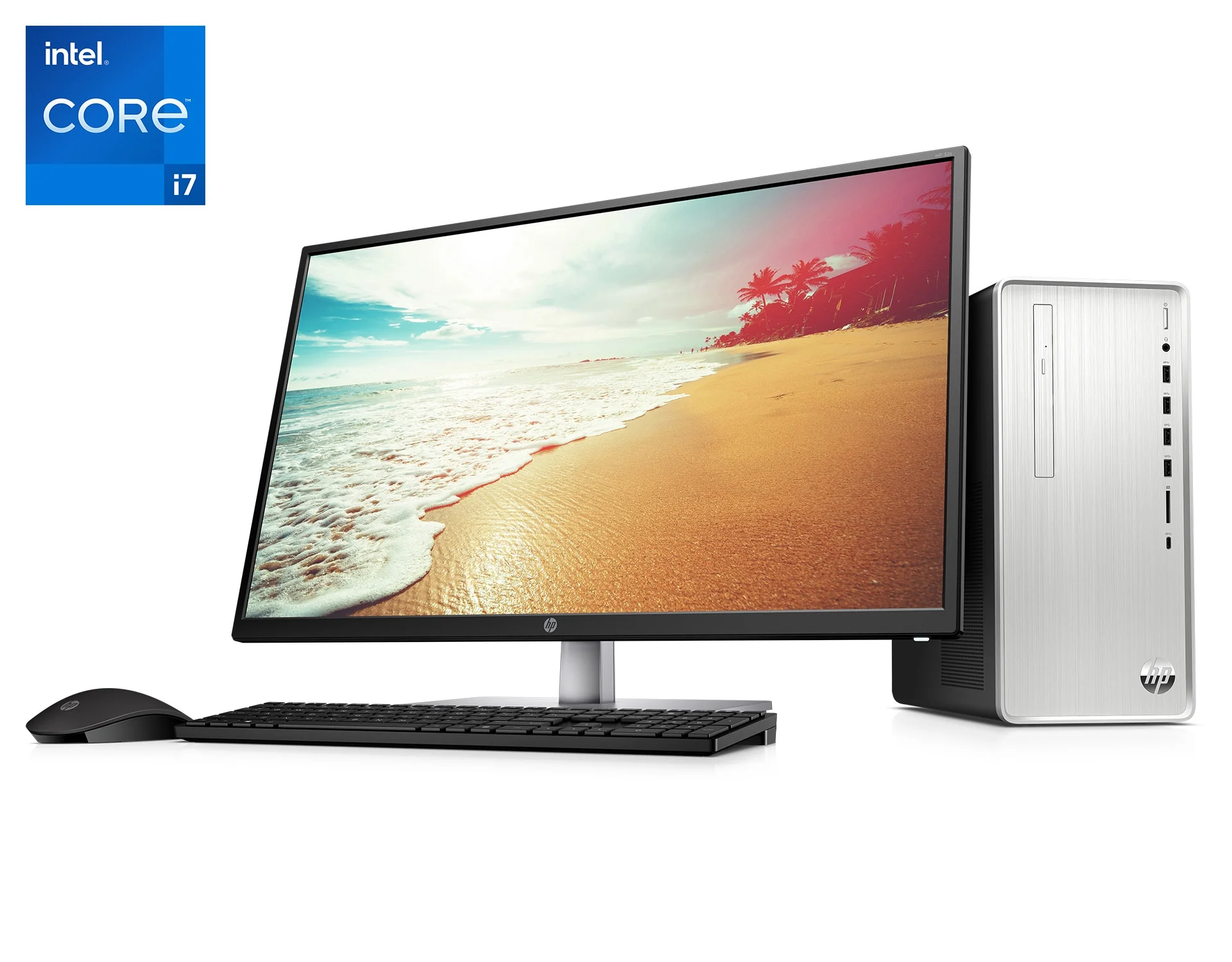
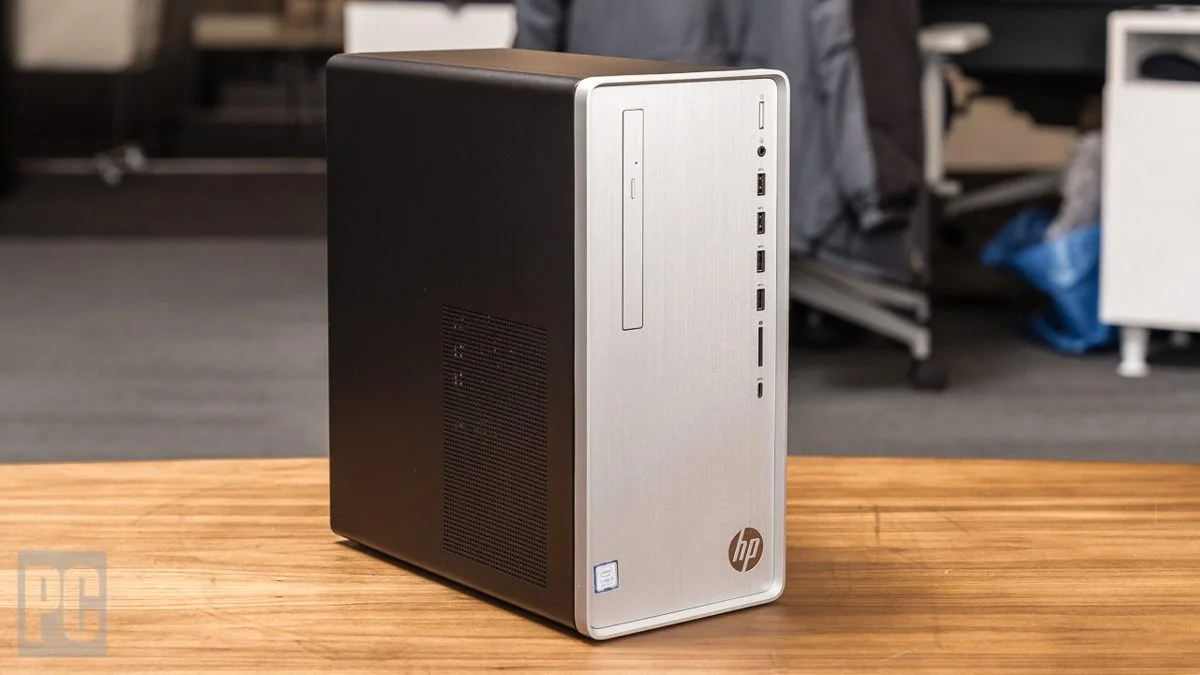
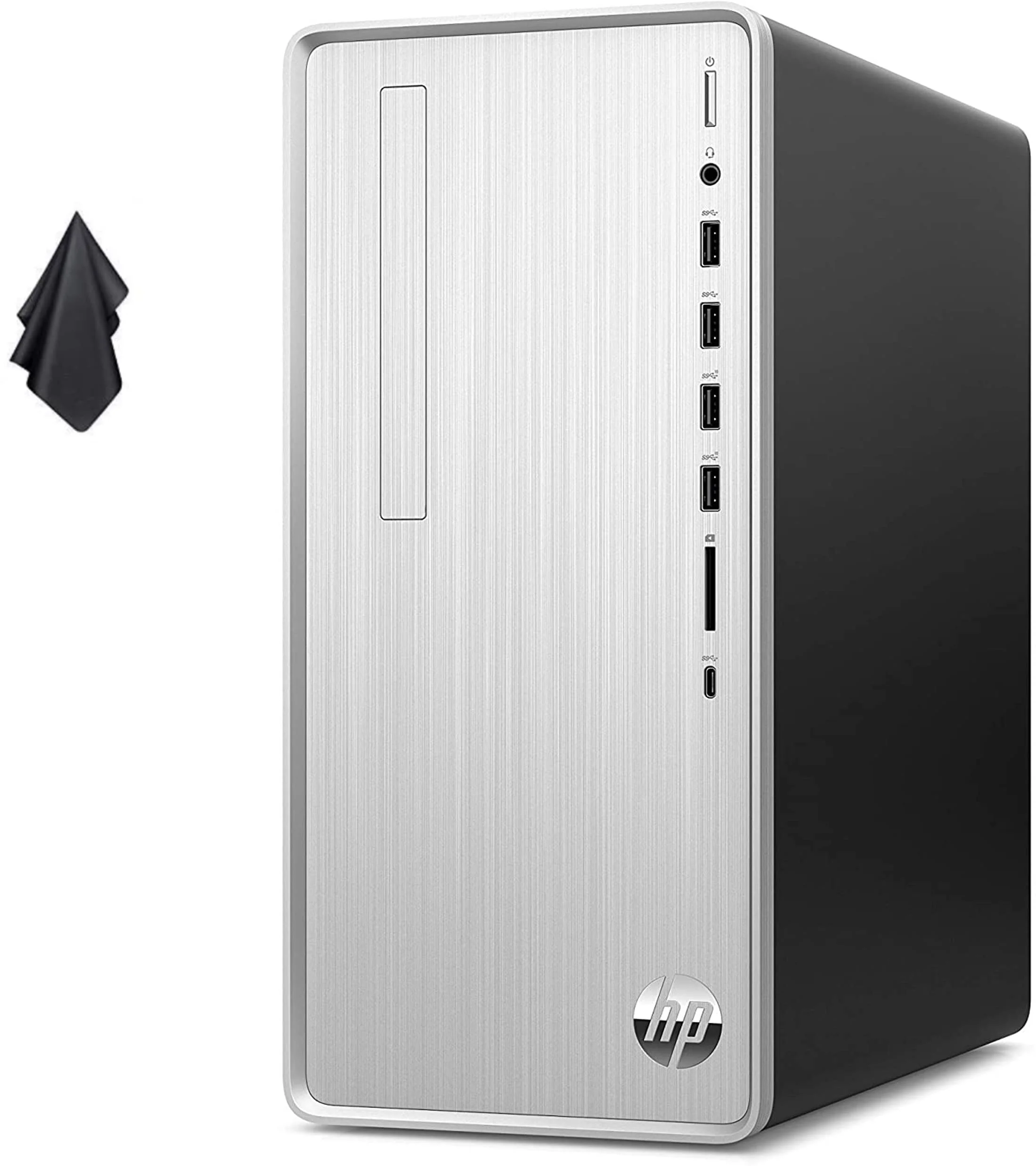
HP has largely maintained the signature “Snow White” and “Natural Silver” brushed-finish aesthetic for the Pavilion TP01 line, and in 2026, it remains an elegantly understated chassis. It is not designed to turn heads with aggressive angles or RGB lighting; instead, it blends seamlessly into a modern home office or living room. The compact mid-tower frame takes up minimal floor or desk space, while the front panel offers an easily accessible array of I/O ports, including multiple USB-A slots, a USB-C port, a full-sized SD card reader, and an audio combo jack.
Material-wise, the case relies heavily on plastics for the front fascia mounted over a standard steel chassis. While the plastic faceplate might feel slightly less premium than an all-aluminum enclosure, the build quality is sturdy with no noticeable flex or rattling when the internal fans spool up.
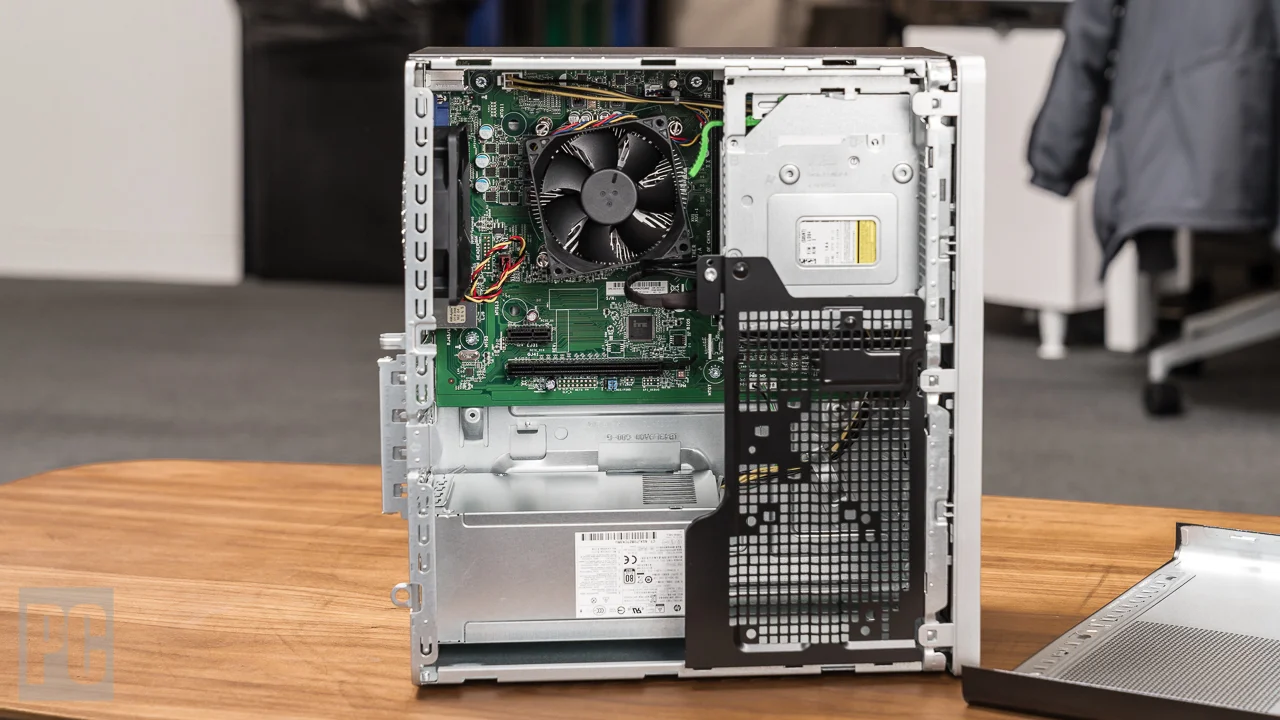
Inside, the layout is highly functional but noticeably cramped, a typical hallmark of proprietary OEM designs. Upgradability is present but limited; getting to the RAM and storage requires navigating a tightly packed interior equipped with a non-standard motherboard and proprietary power supply. This setup might frustrate seasoned PC builders looking for long-term expansion, but it is perfectly adequate for the plug-and-play demographic.
Performance
Equipped with Intel’s 14th-generation Core processors (our review unit features the Core i7-14700) and 16GB of rapid DDR5 RAM, the 2026 HP Pavilion TP01 easily chews through demanding office tasks. Whether you are running complex Excel macros, keeping forty web browser tabs open, or rendering lightweight 1080p video, the system remains remarkably responsive. The inclusion of a 1TB PCIe 4.0 NVMe SSD ensures lightning-fast boot times and snappy application launches, keeping your daily workflow completely bottleneck-free.
Graphical performance, however, is where the TP01 shows its home-office roots. Relying primarily on Intel UHD Graphics 770, it handles high-resolution video playback and dual-monitor setups effortlessly, but it falls short in modern 3D gaming or heavy GPU-accelerated rendering. If you want to play recent AAA titles, you will be heavily restricted. Some configurations offer an entry-level discrete GPU like the NVIDIA RTX 3050, which provides a welcome boost for casual gamers and creators, but this inherently remains a productivity machine rather than a dedicated gaming rig.
Thermal management is well-calibrated for the intended workloads. The single exhaust fan and CPU cooler run near-silently during basic tasks, maintaining a peaceful work environment. When pushed to its absolute limits during synthetic CPU benchmarks, the fans do become audible, and we noticed mild thermal throttling on the highest-end i7 models. Fortunately, for the target demographic of remote workers and home users, the TP01 remains cool and blissfully quiet 95% of the time.
Features & Software
Out of the box, the Pavilion TP01 runs Windows 11 Home and comes equipped with Wi-Fi 6E and Bluetooth 5.3, ensuring robust, low-latency wireless connectivity. One standout hardware feature is the front-mounted optical drive—an absolute rarity in 2026—and the built-in SD card reader, making it incredibly convenient for users who still handle physical media or routinely transfer files from digital cameras.
On the software side, HP’s inclusion of proprietary bloatware remains a slight annoyance. Programs like HP Support Assistant and McAfee LiveSafe pop-ups clutter an otherwise clean Windows experience. While the Support Assistant is genuinely helpful for downloading BIOS updates and specific drivers, tech-savvy users will likely spend their first hour uninstalling the bundled antivirus trials and promotional shortcuts to reclaim system resources.
Value Proposition
The HP Pavilion Desktop TP01 sits comfortably in the budget-to-midrange tier, usually retailing between $600 and $900 depending on the specific processor and storage configuration. For users who need a dependable, ready-to-use system backed by a solid manufacturer warranty, the price-to-performance ratio is quite strong. You are ultimately paying for the convenience of a pre-built ecosystem that works flawlessly right out of the box, rather than maximizing hardware per dollar through a DIY custom build.
When factoring in the included keyboard and mouse combo—basic as they are—the TP01 serves as a complete starter package. It completely avoids the premium pricing of boutique productivity desktops while delivering enough computing horsepower to stay relevant and snappy for at least the next five years of standard home or office use.
How It Compares
When pitted against the Dell Inspiron Desktop (3030), the HP Pavilion TP01 wins out on front-panel connectivity (especially the inclusion of the SD card reader) and features a slightly more attractive, modern chassis. However, the Dell Inspiron often provides marginally better internal airflow and uses fewer proprietary internal components, giving it a slight edge for those who want to upgrade down the line. Against the Acer Aspire TC, the HP Pavilion usually commands a small price premium but justifies it with faster DDR5 memory in its 2026 iterations and a significantly quieter acoustic profile under heavy load.
Pros and Cons
Pros
- Sleek, unobtrusive design that fits perfectly into any home office setup.
- Excellent front-panel I/O, including a built-in SD card reader and a modern USB-C port.
- Snappy day-to-day performance driven by 14th-Gen Intel processors and fast DDR5 RAM.
- Runs incredibly quiet during standard productivity and web browsing workloads.
Cons
- Cramped interior with a proprietary motherboard and power supply severely limits future upgradeability.
- Comes pre-loaded with unnecessary bloatware like McAfee LiveSafe that requires manual removal.
- Integrated graphics are highly insufficient for modern gaming or heavy 3D rendering.
- The bundled wired keyboard and mouse feel cheap and flimsy.
FAQ
Q: Can I upgrade the graphics card in the HP Pavilion Desktop TP01?
A: It is possible but highly restricted. Because the system uses a proprietary power supply (usually 180W or 310W) and has limited physical chassis clearance, you can generally only install low-profile, bus-powered GPUs that do not require external PCIe power cables.
Q: Does the 2026 HP Pavilion TP01 come with Wi-Fi built-in?
A: Yes, it comes equipped with modern Wi-Fi 6E and Bluetooth 5.3 out of the box, alongside a standard RJ-45 Gigabit Ethernet port for fast wired connections.
Q: Is the HP Pavilion TP01 good for gaming?
A: Not straight out of the box. Unless you purchase a specific configuration with a dedicated GPU, the base integrated Intel graphics are only suitable for older, less demanding esports titles played at 1080p on low settings.
Q: Does it include a CD/DVD drive?
A: Yes, surprisingly for 2026, many configurations of the Pavilion TP01 still feature a front-mounted DVD-Writer optical drive, which is a fantastic bonus for users with legacy media.
Verdict
The HP Pavilion Desktop TP01 is a highly capable and reliable pre-built PC perfectly tailored for remote workers, students, and general home users. While it won’t satisfy hardcore gamers or PC tinkering enthusiasts due to its proprietary internal layout, its excellent connectivity, whisper-quiet operation, and robust processing power make it a fantastic plug-and-play solution. If you want a no-fuss desktop that looks great and handles heavy multitasking with ease, the TP01 is an easy recommendation.
Where to Buy
Pros
- ✓ Sleek, unobtrusive design that fits perfectly into any home office setup.
- ✓ Excellent front-panel I/O, including a built-in SD card reader and a modern USB-C port.
- ✓ Snappy day-to-day performance driven by 14th-Gen Intel processors and fast DDR5 RAM.
- ✓ Runs incredibly quiet during standard productivity and web browsing workloads.
Cons
- ✗ Cramped interior with a proprietary motherboard and power supply severely limits future upgradeability.
- ✗ Comes pre-loaded with unnecessary bloatware like McAfee LiveSafe that requires manual removal.
- ✗ Integrated graphics are highly insufficient for modern gaming or heavy 3D rendering.
- ✗ The bundled wired keyboard and mouse feel cheap and flimsy.
Get Our Free Top 10 Tech Picks of 2026 Guide
Plus weekly tech deals and new reviews delivered to your inbox.
[cp_email_signup]
No spam. Unsubscribe anytime.
Ready to buy the HP Pavilion Desktop TP01?
Affiliate link — we may earn a commission at no extra cost to you.



