




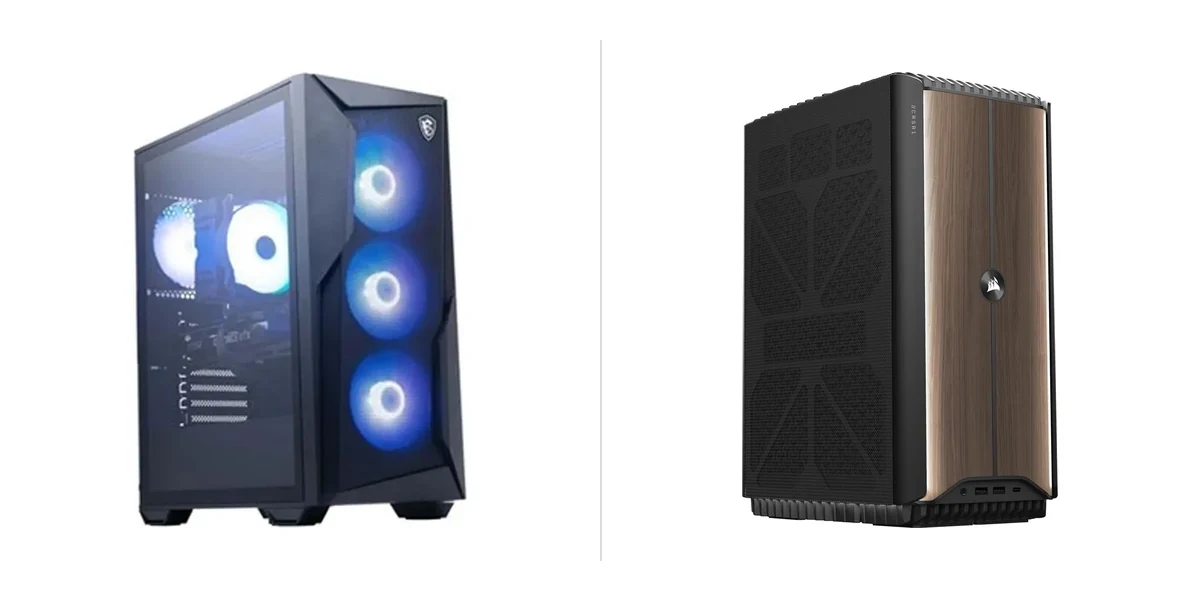
The MSI Codex R2 and Corsair One i500 represent two distinct approaches to 2026 high-end gaming desktops. The MSI delivers exceptional 4K performance and upgrade-friendly design at a more accessible price, while the Corsair prioritizes compact luxury, silent operation, and premium refinement in a 15-liter chassis. This head-to-head examines which system better suits different user needs and budgets.
At a Glance
| Feature | MSI Codex R2 | Corsair One i500 |
|---|---|---|
| Price | $1699.99 | $2799.99 |
| Overall Score | 84/100 | 81/100 |
| Best For | Value-focused 4K gamers wanting upgradability | Users seeking compact premium builds |
| Chassis & Weight | Spacious tool-less design (14.8 kg) | Impressively compact 15-liter aluminum |
| Noise Under Load | Noticeable fan noise | Whisper-quiet operation |
| Upgradeability | Straightforward with spacious interior | Limited due to dense packing |
Design and Build
The MSI Codex R2 employs a spacious, tool-less chassis that makes future upgrades straightforward for enthusiasts. At 14.8 kg it is quite heavy and less ideal for users who frequently move their PC. Customizable RGB lighting and an intuitive software experience further enhance its appeal, though the front I/O panel could benefit from additional USB ports.
In contrast, the Corsair One i500 features premium aluminum construction with refined aesthetics and immaculate build quality packed into a remarkably compact 15-liter chassis. Its tempered glass panel looks stunning but shows fingerprints easily and requires regular cleaning. The dense component packing and proprietary cooling contribute to its limited internal upgradeability. For detailed analysis, read our full Corsair One i500 review.
Performance and Features
The MSI Codex R2 delivers exceptional 4K gaming performance with its RTX 5080 and DLSS 4, providing smooth gameplay in demanding titles. Its strong thermal design keeps both CPU and GPU temperatures well controlled even during marathon sessions. Modern connectivity options including Wi-Fi 7 and USB4 help future-proof the system, though it produces noticeable fan noise when both CPU and GPU are under full load. As covered in our full review of MSI Codex R2, the MSI Center software is generally intuitive but does include some bloatware requiring manual removal.
The Corsair One i500 achieves flagship desktop performance within its compact chassis, backed by exceptional thermal management that enables whisper-quiet operation under load. It offers future-proof connectivity with Wi-Fi 7 and Thunderbolt 5, plus highly polished iCUE software that enhances the user experience. However, it draws high power consumption during peak loads, which may concern users mindful of electricity costs. It also lacks an optical drive or memory card reader, requiring external solutions.
Both systems deliver top-tier real-world gaming results, but they cater to different priorities: the MSI favors raw performance and expandability with some acoustic trade-offs, while the Corsair emphasizes silence and refinement in a space-saving form factor.
Pricing and Value
At $1699.99, the MSI Codex R2 delivers substantially better value than the Corsair One i500 at $2799.99. The MSI’s lower price combined with its higher overall score and strong upgrade potential makes it far more accessible for enthusiasts seeking high-end 4K gaming without the luxury tax.
The Corsair One i500 positions itself as a premium luxury product. While its compact design, silent operation, and refined build quality justify the higher cost for users who prioritize those traits, most gamers will find the MSI offers superior performance-per-dollar.
Pros and Cons
MSI Codex R2
Pros:
– Exceptional 4K gaming performance with RTX 5080 and DLSS 4 delivering smooth gameplay in demanding titles.
– Strong thermal design keeps both CPU and GPU temperatures well controlled even during marathon sessions.
– Tool-less design and spacious interior make future upgrades straightforward for enthusiasts.
– Modern connectivity including Wi-Fi 7 and USB4 future-proofs the system for years ahead.
– Customizable RGB and intuitive MSI Center software enhance the overall user experience.
Cons:
– The system produces noticeable fan noise when both CPU and GPU are under full load.
– MSI Center still includes some bloatware that requires manual removal during initial setup.
– At 14.8 kg, the Codex R2 is quite heavy and not ideal for users who frequently move their PC.
– The front I/O panel could benefit from additional USB ports for peripheral-heavy users.
– Premium pricing may put it out of reach for gamers on more modest budgets.
Corsair One i500
Pros:
– Delivers flagship desktop performance in an impressively compact 15-liter chassis.
– Exceptional thermal management and whisper-quiet operation under load.
– Premium aluminum construction with refined aesthetics and immaculate build quality.
– Future-proof connectivity including Wi-Fi 7 and Thunderbolt 5.
– Highly polished iCUE software that enhances rather than complicates the experience.
Cons:
– The premium pricing positions it as a luxury product out of reach for many enthusiasts.
– Limited internal upgradeability due to the dense component packing and proprietary cooling.
– High power consumption during peak loads, which may concern users with electricity costs in mind.
– The tempered glass panel, while beautiful, shows fingerprints easily and requires regular cleaning.
– No optical drive or memory card reader, requiring external solutions for some users.
Who Should Buy Which
Buy the MSI Codex R2 if you want exceptional 4K gaming performance, strong thermals, and straightforward upgradeability without spending luxury money. It suits enthusiasts who value the tool-less spacious design, modern connectivity like Wi-Fi 7 and USB4, and are willing to accept some fan noise under load and a heavier chassis in exchange for significantly better value.
Choose the Corsair One i500 if compact size, whisper-quiet operation, and premium aesthetics are your top priorities. It is ideal for users with limited space who appreciate refined aluminum construction, polished software, and flagship performance in a 15-liter chassis, provided they can afford the luxury price and don’t plan on frequent internal upgrades.
Verdict
The MSI Codex R2 wins overall in this 2026 comparison. It earns a higher score (84 vs 81), delivers exceptional 4K gaming performance and strong thermals, and offers far better value at $1699.99 compared to the Corsair’s $2799.99 luxury positioning.
The Corsair One i500 is best for users whose primary needs are a compact footprint and whisper-quiet operation in a beautifully crafted chassis. For most gamers and enthusiasts, however, the MSI Codex R2 strikes a superior balance of performance, features, and price.