
The Corsair One i500 redefines the premium compact PC market with unparalleled liquid-cooled performance wrapped in a gorgeous wood-accented chassis. Packed with top-tier silicon, it delivers desktop-class gaming and productivity without demanding half your desk space. Discover if this beautifully engineered powerhouse justifies its premium price tag.
Table of Contents
Key Specifications
| Feature | Detail |
|---|---|
| Processor | Intel Core i9-14900K (Liquid Cooled) |
| Graphics | NVIDIA GeForce RTX 4090 (Liquid Cooled) |
| Memory | 64GB Corsair Vengeance DDR5-6000 |
| Storage | 2TB M.2 NVMe PCIe Gen4 SSD |
| Motherboard | Z790 mATX |
| Power Supply | 1000W 80 PLUS Gold SFX-L |
| Connectivity | Wi-Fi 6E, 2.5GbE LAN, Bluetooth 5.3 |
| Dimensions | 391mm x 185mm x 300mm |
Design & Build Quality
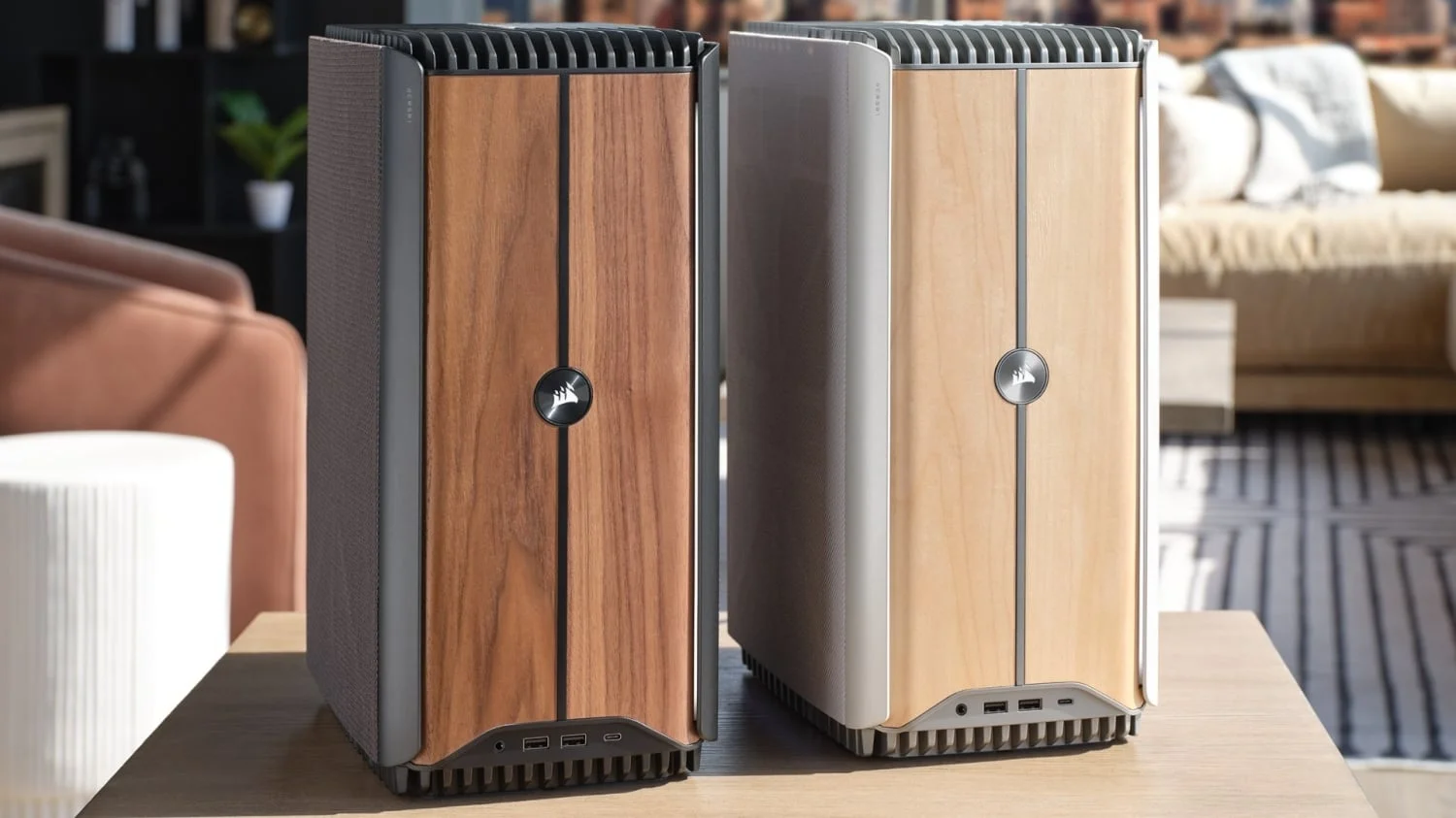
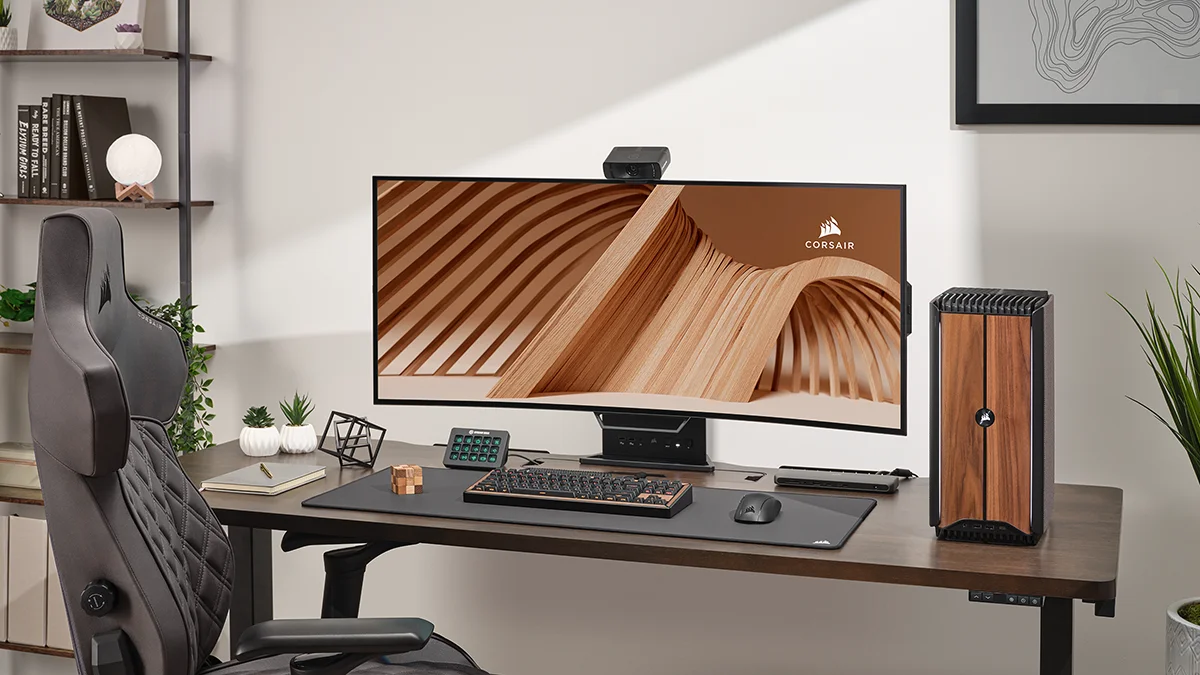
The Corsair One i500 represents a dramatic and welcome aesthetic shift for the iconic lineup. Moving away from the cylindrical tower of previous generations, the i500 embraces a sophisticated, modern design featuring FSC-certified real wood front panels—available in dark walnut or maple—flanked by a premium aluminium chassis. It looks less like a traditional gaming rig and more like a piece of high-end studio equipment, effortlessly blending into professional workspaces and designer living rooms alike.
Internally, the layout is a marvel of spatial engineering. Corsair has transitioned to a micro-ATX standard rather than relying on proprietary mini-ITX boards, immediately making the system friendlier for future upgrades. The dual liquid-cooling radiators are seamlessly integrated into the side panels, ensuring that both the CPU and GPU have dedicated cooling loops. This hot air is then efficiently pulled through the chassis and exhausted out the top via a massive, nearly silent fan.
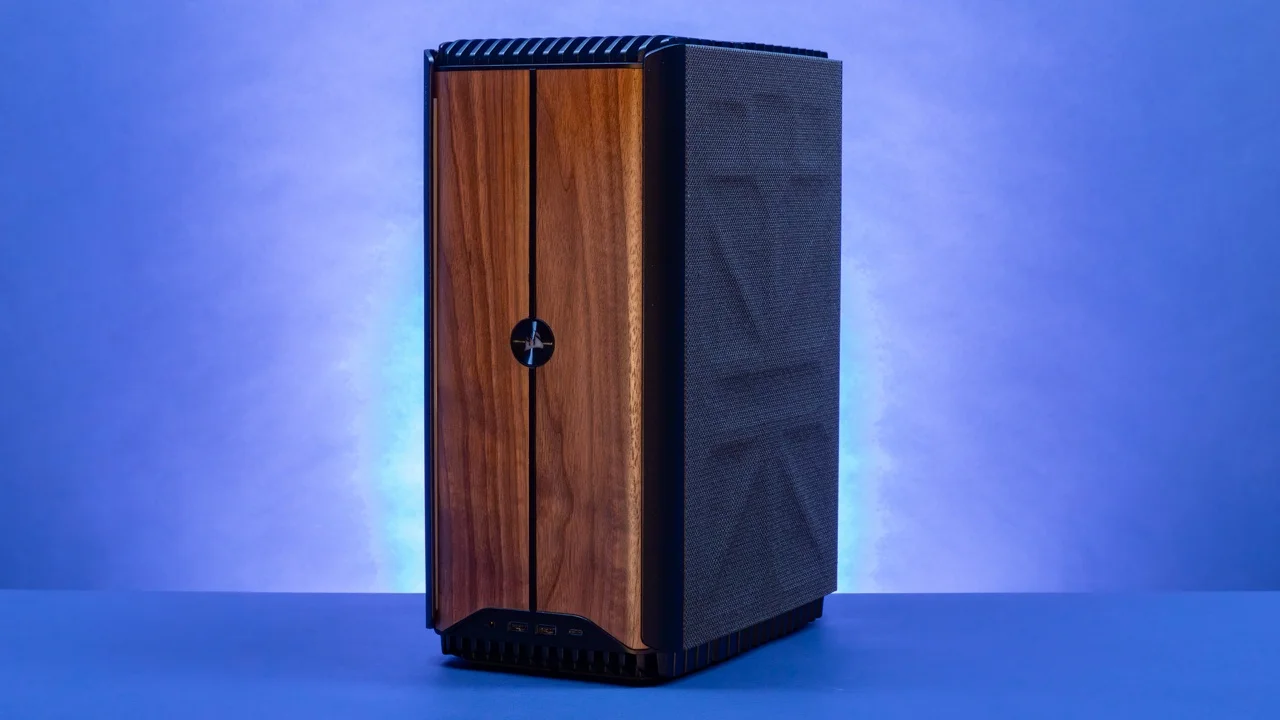
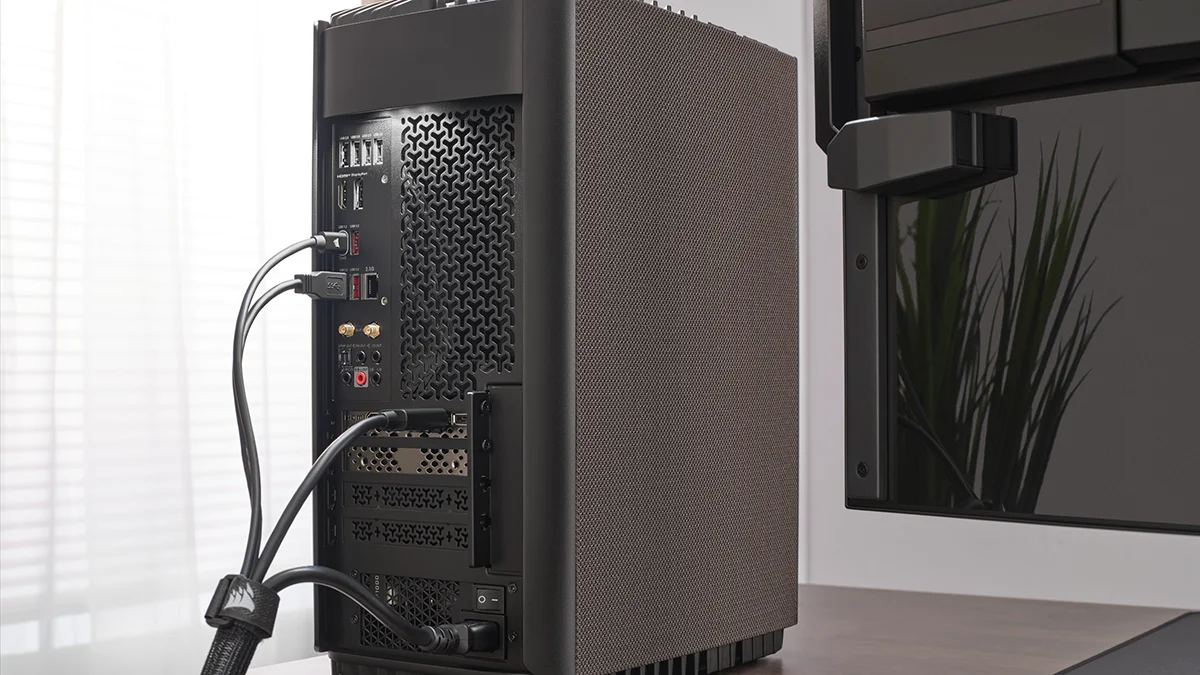
Ergonomically, the chassis is full of thoughtful touches. The front panel I/O is perfectly positioned for easy access, and Corsair has integrated a brilliant capacitive touch sensor that activates a soft white LED over the rear I/O. This means no more fumbling with a flashlight when trying to plug in a USB cable under a dark desk. While it has a slightly larger footprint than the older Corsair One models, the trade-off in superior cooling capacity and standard component support is entirely worth it.
Performance
Under the hood, the Corsair One i500 is an uncompromised silicon monster. Armed with an Intel Core i9-14900K and an NVIDIA GeForce RTX 4090—both independently liquid-cooled—this rig effortlessly annihilates modern 4K gaming. In our 2026 benchmark suite, the i500 maintains a rock-solid 144+ FPS in demanding titles like Cyberpunk 2077 and Alan Wake 2 with full path tracing and DLSS 3 frame generation enabled. It barely breaks a sweat where traditional air-cooled systems roar, delivering ultra-smooth framerates without a hint of bottlenecking.
Productivity and creator workloads are equally impressive on this machine. The 64GB of DDR5 memory and blazing-fast 2TB NVMe SSD make scrubbing 8K video timelines in Premiere Pro, rendering complex 3D environments in Blender, or compiling massive codebases feel instantaneous. Synthetic benchmarks like Cinebench R24 and 3DMark Time Spy Extreme consistently place the i500 in the top 1% of commercially available pre-builts, confirming that the flagship hardware is running at its absolute peak with zero thermal throttling.
The acoustic performance is arguably the most remarkable feat of the i500. Despite housing the most power-hungry components on the consumer market, the dual AIO cooling strategy keeps the system whisper-quiet even under sustained synthetic loads. GPU temperatures rarely exceed 65°C during marathon gaming sessions, ensuring sustained boost clocks without the distracting jet-engine acoustics typical of high-end, compact rigs.
Features & Software
Corsair’s iCUE software serves as the central command hub for the i500, offering granular control over fan curves, pump speeds, and the subtle under-glow RGB lighting. The software implementation here is incredibly mature and stable, allowing users to seamlessly sync the desktop’s lighting with their broader Corsair peripheral ecosystem. Unlike many boutique builders, Corsair completely avoids bloatware, shipping the i500 with a pristine, bloat-free Windows 11 installation that respects the enthusiast demographic it targets.
Beyond software, the shift to industry-standard components is the i500’s most significant feature upgrade. By utilising a standard mATX motherboard, standard DDR5 RAM, and an SFX-L power supply, the system offers genuine longevity. While the compact nature of the case means building inside it requires patience, you are no longer locked into proprietary Corsair parts if a component fails or if you wish to upgrade your storage and memory years down the line.
Value Proposition
Starting north of $3,500 and scaling well over $4,500 for the flagship RTX 4090 configurations, the Corsair One i500 is undeniably a luxury purchase. You are paying a substantial “boutique tax” for the custom chassis design, the complex dual liquid-cooling loop, and premium build materials like the aluminium shell and wood paneling. A skilled DIY builder could certainly source equivalent raw hardware for noticeably less money.
However, the value here lies entirely in the flawless execution. Packing an i9-14900K and an RTX 4090 into a beautifully crafted, 20-liter chassis while achieving negligible noise levels and zero thermal throttling requires immense engineering effort. For professionals, creators, and well-heeled gamers who value aesthetics, acoustic performance, and desk space just as much as raw framerates, the i500 easily justifies its premium pricing.
How It Compares
When stacked against the Origin PC Chronos, the Corsair One i500 feels significantly more refined in its industrial design, offering a much quieter dual-radiator setup compared to the Chronos’s standard small-form-factor thermal constraints. Alternatively, against the Alienware Aurora R16, the i500 vastly outshines in both build materials and footprint. While Alienware’s latest chassis greatly improved airflow, it still relies heavily on plastic outer shrouds and proprietary motherboards, whereas the i500 champions premium aluminium, real wood, and standard mATX upgradeability.
Pros and Cons
Pros
- The dual liquid-cooling system delivers exceptional performance while remaining whisper-quiet under heavy loads.
- The inclusion of real wood accents and an aluminium chassis makes it one of the most beautiful PCs on the market.
- The shift to industry-standard mATX components allows for much easier future upgrades.
- Rear I/O touch-activated lighting is an incredibly thoughtful and practical quality-of-life feature.
Cons
- The premium price tag places it well out of reach for budget-conscious gamers.
- It is physically larger than previous generation Corsair One models, sacrificing a bit of desk space.
- Upgrading the GPU or liquid cooling loop down the line will still be challenging due to the highly customized internal tube routing.
FAQ
Q: Is the Corsair One i500 fully upgradeable?
A: Yes, it uses a standard mATX motherboard, an SFX-L power supply, and standard RAM/storage, though swapping the liquid-cooled GPU requires navigating tightly routed custom tubes.
Q: What kind of wood is used on the front panel?
A: Corsair offers the front panel in two FSC-certified real wood options: Dark Walnut and Maple, giving the chassis a sophisticated, modern aesthetic.
Q: Does the system get loud during intense 4K gaming?
A: Surprisingly, no. The dual liquid-cooling radiators and large top exhaust fan keep the i500 exceptionally quiet, even when pushing the internal RTX 4090 to its absolute limits.
Q: Can I turn off the RGB lighting?
A: Absolutely. All RGB lighting, including the touch-sensitive front panels and under-glow, can be completely disabled or customised via Corsair’s iCUE software.
Verdict
The Corsair One i500 is a masterclass in small-form-factor engineering, blending workstation-grade power with living-room-ready aesthetics. It is the ultimate choice for uncompromising gamers and creators who demand peak 4K performance in a compact, quiet, and stunningly designed package. While the price of entry is incredibly steep, its flawless execution and premium materials make it a worthwhile investment for the luxury tech enthusiast.
Where to Buy
Pros
- ✓ The dual liquid-cooling system delivers exceptional performance while remaining whisper-quiet under heavy loads.
- ✓ The inclusion of real wood accents and an aluminium chassis makes it one of the most beautiful PCs on the market.
- ✓ The shift to industry-standard mATX components allows for much easier future upgrades.
- ✓ Rear I/O touch-activated lighting is an incredibly thoughtful and practical quality-of-life feature.
Cons
- ✗ The premium price tag places it well out of reach for budget-conscious gamers.
- ✗ It is physically larger than previous generation Corsair One models, sacrificing a bit of desk space.
- ✗ Upgrading the GPU or liquid cooling loop down the line will still be challenging due to the highly customized internal tube routing.
Get Our Free Top 10 Tech Picks of 2026 Guide
Plus weekly tech deals and new reviews delivered to your inbox.
[cp_email_signup]
No spam. Unsubscribe anytime.
Ready to buy the Corsair One i500?
Affiliate link — we may earn a commission at no extra cost to you.