










The Acer Nitro 5 has long been the undisputed king of budget gaming, but the 2025 model aims to punch above its weight class with next-generation silicon and a refined chassis. We put this popular gaming laptop through its paces to see if it still delivers the ultimate bang for your buck. Read on to discover if the latest Nitro iteration deserves a permanent spot on your desk.
Table of Contents
Key Specifications
| Feature | Detail |
|---|---|
| Processor (CPU) | Intel Core i7-14700HX (up to 5.5 GHz) |
| Graphics (GPU) | Nvidia GeForce RTX 4060 (8GB GDDR6, 140W TGP) |
| Memory (RAM) | 16GB DDR5-5600MHz (Upgradeable to 32GB) |
| Storage | 1TB PCIe Gen 4 NVMe SSD (Two M.2 slots) |
| Display | 15.6-inch QHD (2560 x 1440) IPS, 165Hz, 3ms response, 100% sRGB |
| Battery | 90Whr with 230W power adapter |
| Weight | 5.51 lbs (2.5 kg) |
Design & Build Quality
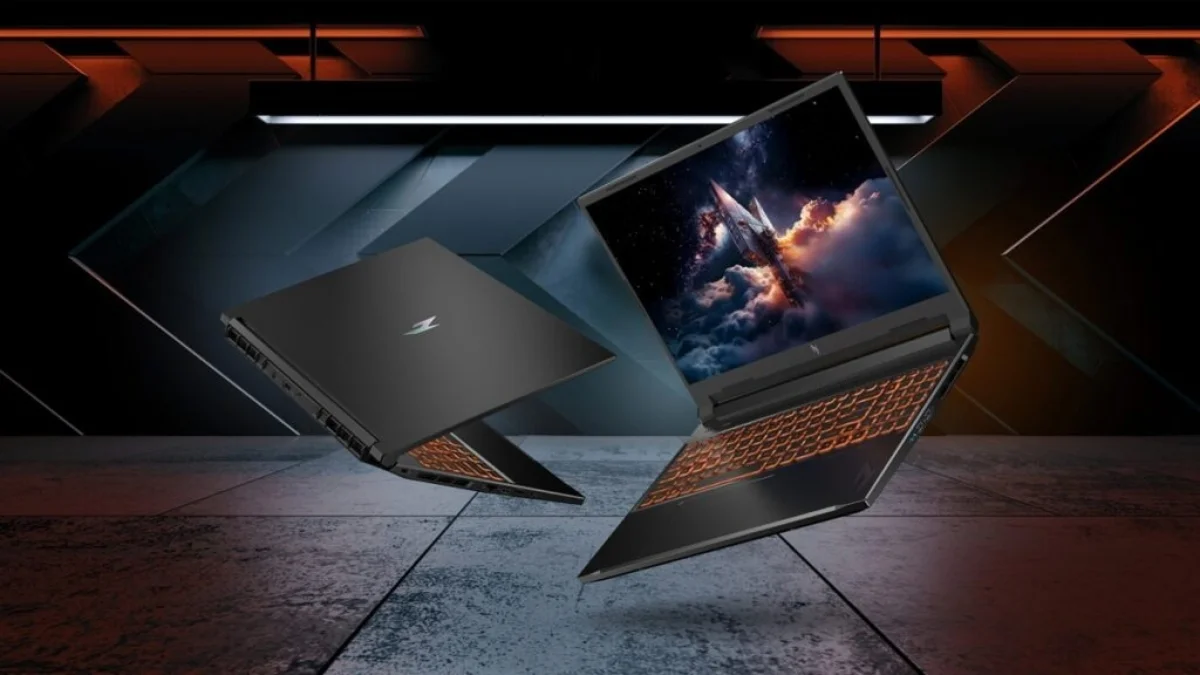
The Acer Nitro 5 (2025 model) continues the brand’s welcome departure from the aggressively “gamer” aesthetics of the early 2020s. Gone are the stark red accents and angular, spaceship-esque vents. Instead, Acer has embraced a stealthier, matte black chassis adorned with subtle cyberpunk-inspired topographical lines on the lid. While the laptop is still constructed entirely of plastic to keep costs down, the structural integrity is surprisingly robust. There is minimal flex in the keyboard deck, though the lid does wobble slightly when adjusting the screen.
Ergonomically, the Nitro 5 gets the fundamentals right. The full-sized keyboard features a 4-zone RGB backlight that shines brightly through the keycaps, offering deep, satisfying travel that feels excellent for both fast-twitch gaming and long typing sessions. The trackpad is spacious and responsive, utilizing Windows Precision drivers, though most users will instinctively reach for a dedicated gaming mouse.

One of the most appreciated design choices carried over to the 2025 model is the strategic port placement. The power connector, HDMI 2.1 port, and a Thunderbolt 4 port are situated on the rear exhaust block, keeping thick, cumbersome cables out of the way of your mouse hand. The side edges house the remaining USB-A ports, an Ethernet jack, and a 3.5mm combo audio jack, ensuring you have all the connectivity required for a modern desktop-replacement setup.
Performance
Under the hood, the 2025 Acer Nitro 5 is an absolute powerhouse for its price bracket. Equipped with an Intel Core i7-14700HX and an Nvidia RTX 4060 graphics card running at a full 140W Total Graphics Power (TGP), this machine chews through modern titles without breaking a sweat. In real-world testing, it easily hits the 60+ FPS mark in demanding AAA games like Cyberpunk 2077 and Alan Wake 2 at 1440p resolution, provided you leverage Nvidia’s DLSS 3 and frame generation technology. For esports titles like Valorant and Apex Legends, the Nitro 5 easily maxes out the 165Hz refresh rate of its QHD panel.
Beyond raw frame rates, the 1TB PCIe Gen 4 SSD ensures that load times are practically non-existent, and the 16GB of DDR5 memory provides plenty of bandwidth for multitasking. Whether you are rendering 4K video in Premiere Pro or juggling two dozen Chrome tabs alongside Discord and Spotify, the i7-14700HX handles heavy computational loads with desktop-like efficiency.

Thermal performance is where Acer’s dual-fan cooling system and quad-exhaust design really shine. The implementation of liquid metal thermal grease on the CPU ensures that thermal throttling is kept at bay during marathon gaming sessions. However, this cooling efficiency comes at an acoustic cost. When the fans spin up to maximum RPM on the “Turbo” preset, the laptop becomes remarkably loud, making a good gaming headset a mandatory accessory for immersion.
Features & Software
Acer’s proprietary NitroSense software is the central hub for managing the laptop’s performance, and the 2025 iteration feels cleaner and more intuitive than ever. From this dashboard, users can easily toggle between quiet, balanced, and performance fan profiles, customize the 4-zone RGB keyboard lighting, and monitor CPU/GPU temperatures in real-time. Crucially, NitroSense allows you to control the built-in Advanced Optimus MUX switch, letting you seamlessly route the dedicated GPU directly to the display for a tangible boost in frame rates without needing to restart the system.
On the multimedia front, the 1080p webcam is a welcome standard feature that performs adequately for Zoom calls and casual Discord streams, though it struggles in low-light conditions. Unfortunately, the audio experience remains the Nitro 5’s weak link. The dual 2W down-firing speakers get reasonably loud but lack any meaningful bass, resulting in a hollow sound profile that fails to do justice to modern game audio or cinematic scores.

Value Proposition
The 2025 Acer Nitro 5 sits in a fiercely competitive sweet spot, typically retailing around the $1,100 to $1,300 mark depending on the configuration. At this price, the value proposition is incredibly strong. You are getting premium tier performance components—namely the 140W RTX 4060 and a stunning 1440p 165Hz display—inside a budget-tier chassis.
For the pragmatic, tech-savvy gamer who prioritizes raw performance, high frame rates, and thermal headroom over premium metal builds or high-end speakers, the Nitro 5 is an undeniable steal. It maximizes the “FPS per dollar” metric better than almost anything else on the market right now, effectively democratizing high-refresh-rate 1440p gaming.
How It Compares
When pitted against the Lenovo Legion Slim 5, the Nitro 5 holds its ground in pure gaming performance, though the Legion justifies its slightly higher price tag with a more premium aluminum lid, superior keyboard tactile feedback, and better battery life.
Compared to the ASUS TUF Gaming A15, the Acer Nitro 5 generally offers better thermal dissipation due to its bulkier rear exhaust system. While the TUF A15 offers longer unplugged battery life thanks to its efficiency-focused Ryzen chips, the Intel-powered Nitro 5 pushes slightly higher raw frame rates in CPU-bound games, making it the better choice if it will primarily live on a desk plugged into the wall.
Pros and Cons
Pros
- Delivers excellent 1440p gaming performance and high frame rates for the price point.
- Features a subtle, stealthy redesign that looks professional in an office or classroom.
- Equipped with a robust cooling system and liquid metal that prevents thermal throttling.
- Offers a generous array of ports, including rear-facing power and display connections.
- Includes Advanced Optimus and a MUX switch for maximum graphical efficiency.
Cons
- The all-plastic chassis feels somewhat cheap and attracts oily fingerprints very easily.
- Cooling fans become distractingly loud when running on the highest performance presets.
- Battery life is mediocre, lasting only about 4 hours for basic productivity tasks.
- Down-firing speakers sound hollow, lacking the bass depth needed for immersive media.
FAQ
Q: Does the Acer Nitro 5 (2025) have a MUX switch?
A: Yes, it features Advanced Optimus and a MUX switch, allowing you to bypass the integrated graphics for an immediate boost in gaming performance without restarting the laptop.
Q: Can I upgrade the RAM and storage on this laptop?
A: Absolutely. The bottom panel can be removed to access two SODIMM slots (supporting up to 32GB of DDR5 RAM) and two M.2 PCIe Gen 4 SSD slots for easy storage expansion.
Q: Is the display bright enough for outdoor use?
A: The screen peaks at around 350 nits of brightness. While this is fantastic for indoor gaming, it will struggle with glare if you attempt to use it outdoors in direct sunlight.
Q: How long does the battery last for non-gaming tasks?
A: With the 90Whr battery, you can expect roughly 4 to 5 hours of light web browsing or video playback on lower brightness settings. Gaming on battery power will drain it in under an hour.
Verdict
The Acer Nitro 5 (2025 Model) cements its position as a top-tier choice for budget-conscious gamers who refuse to compromise on frame rates or display quality. While it makes expected sacrifices in build materials, acoustic stealth, and audio fidelity, its outstanding thermal performance and powerful internals make it an unbeatable value. It is highly recommended for entry-level to mid-range PC gamers looking for a reliable, future-proof workhorse.
Where to Buy
Pros
- ✓ Delivers excellent 1440p gaming performance and high frame rates for the price point.
- ✓ Features a subtle, stealthy redesign that looks professional in an office or classroom.
- ✓ Equipped with a robust cooling system and liquid metal that prevents thermal throttling.
- ✓ Offers a generous array of ports, including rear-facing power and display connections.
- ✓ Includes Advanced Optimus and a MUX switch for maximum graphical efficiency.
Cons
- ✗ The all-plastic chassis feels somewhat cheap and attracts oily fingerprints very easily.
- ✗ Cooling fans become distractingly loud when running on the highest performance presets.
- ✗ Battery life is mediocre, lasting only about 4 hours for basic productivity tasks.
- ✗ Down-firing speakers sound hollow, lacking the bass depth needed for immersive media.
Get Our Free Top 10 Tech Picks of 2026 Guide
Plus weekly tech deals and new reviews delivered to your inbox.
[cp_email_signup]
No spam. Unsubscribe anytime.
Ready to buy the Acer Nitro 5 (2025 Model)?
Affiliate link — we may earn a commission at no extra cost to you.



