

The Dell XPS Desktop 8960 proves that massive computing power doesn’t require an aggressive, RGB-laden chassis. Combining Intel’s latest processors with top-tier NVIDIA graphics, this sleek powerhouse caters to creators and gamers alike. Discover if this minimalist workhorse is the right upgrade for your 2026 setup.
Table of Contents
Key Specifications
| Feature | Detail |
|---|---|
| Processor | Up to Intel Core i9-14900K (14th Gen) |
| Graphics | Up to NVIDIA GeForce RTX 4090 (24GB GDDR6X) |
| Memory | Up to 64GB DDR5 (5600 MT/s) |
| Storage | Up to 4TB NVMe M.2 PCIe SSD + 4TB SATA HDD |
| Power Supply | Up to 1000W Platinum (Proprietary) |
| Dimensions | 14.68 x 6.81 x 16.8 inches |
| Operating System | Windows 11 Home / Pro |
Design & Build Quality
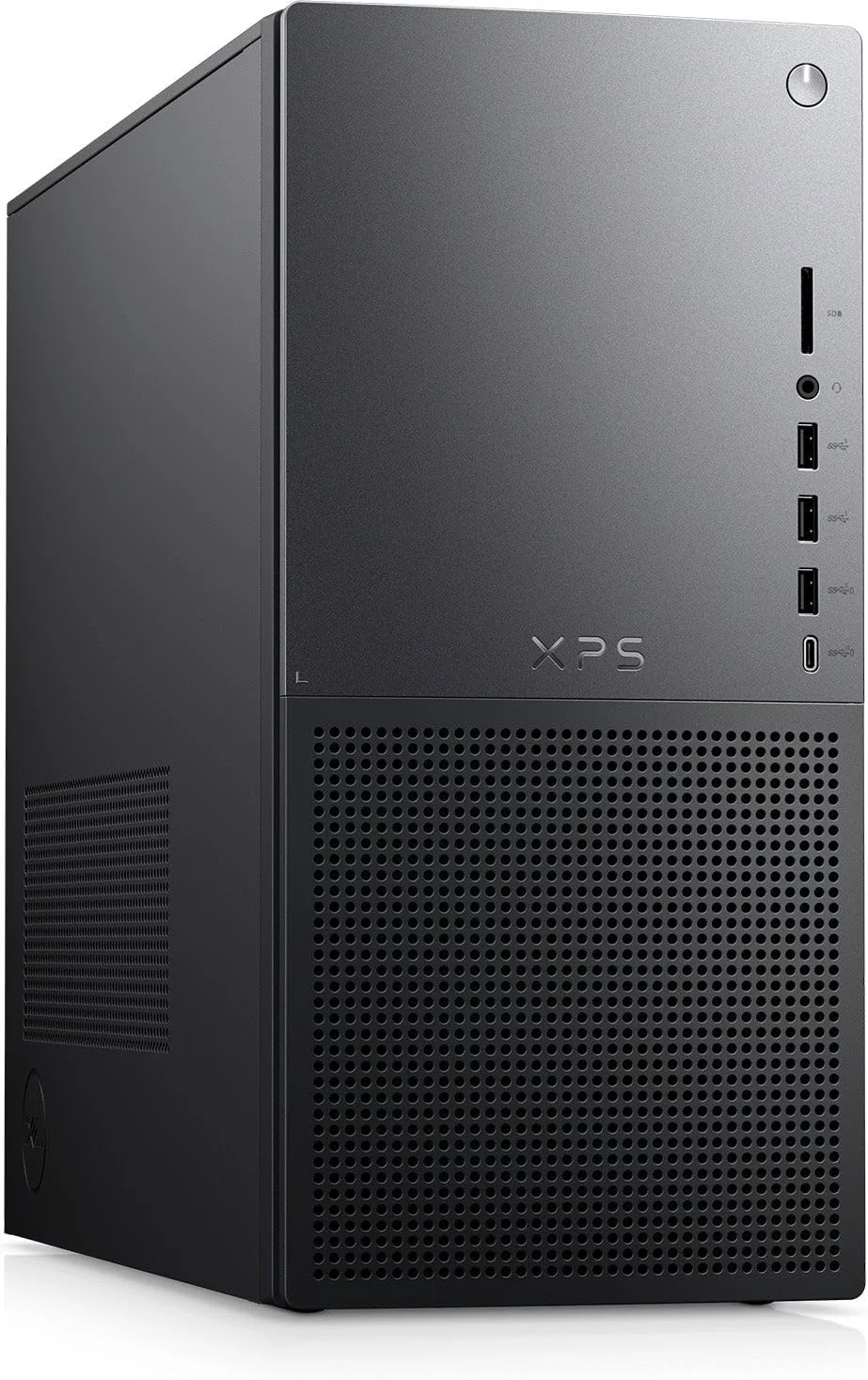
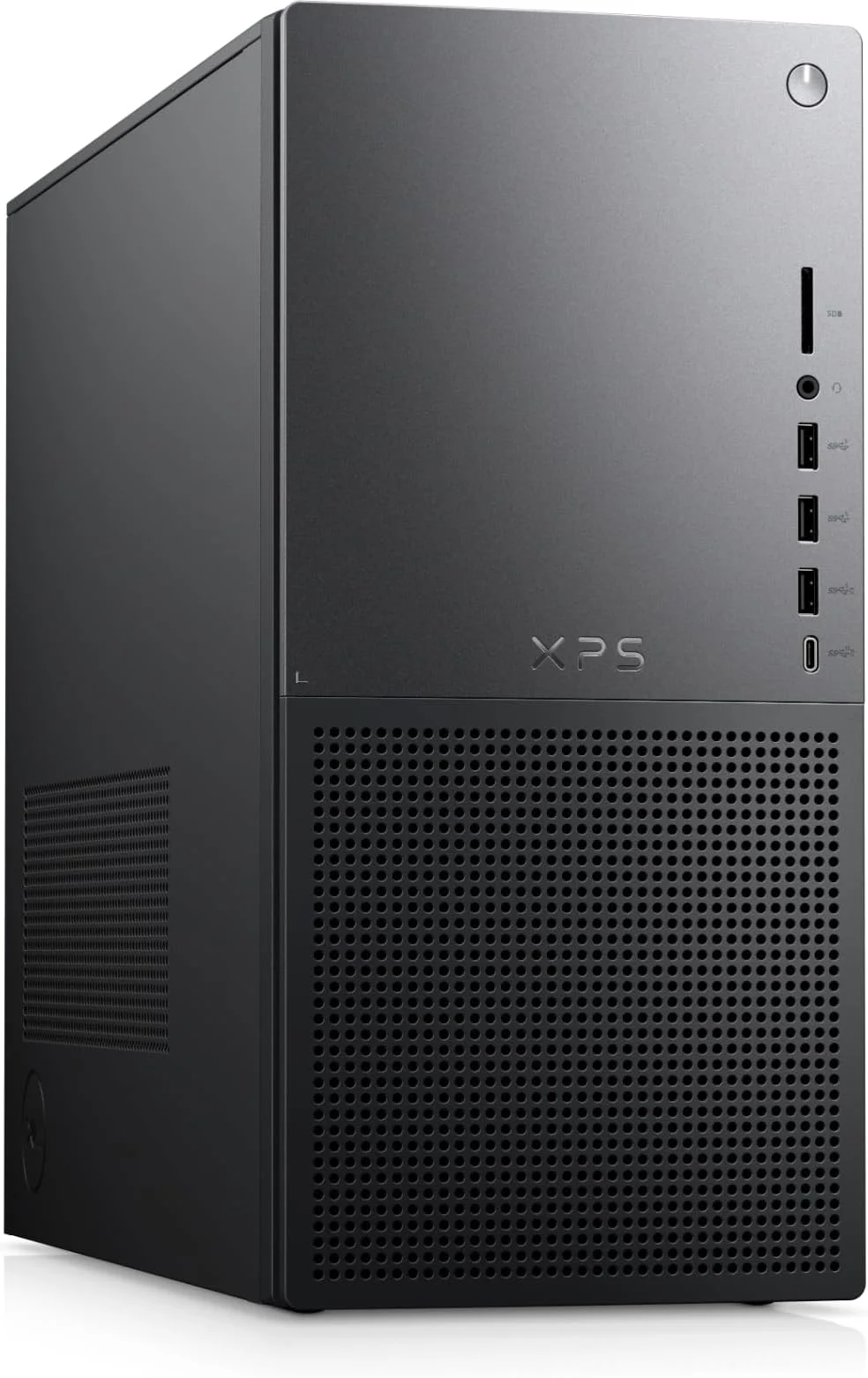
The Dell XPS Desktop 8960 continues the brand’s legacy of delivering immense power wrapped in an understated, executive-friendly chassis. Available in both Platinum Silver and Graphite, the 27L enclosure eschews the aggressive, RGB-heavy aesthetics typical of modern high-end prebuilts. Instead, you get a clean, bead-blasted aluminum front panel that looks equally at home in a professional video editing studio or a sophisticated gaming setup. The honeycomb front bezel not only adds a touch of modern texture but serves a highly functional purpose by maximizing air intake.
Internally, Dell has refined the layout to optimize thermals and acoustics. The spacious interior supports liquid cooling for the CPU, and the strategic placement of high-RPM case fans ensures that the high-wattage components can breathe. Tool-less entry is a welcome carryover from previous generations, allowing tech-savvy users to easily unlatch the side panel to access the RAM, storage, and PCIe slots. While the motherboard is proprietary—a common sticking point for DIY enthusiasts—the cable management is notably tidy out of the box.
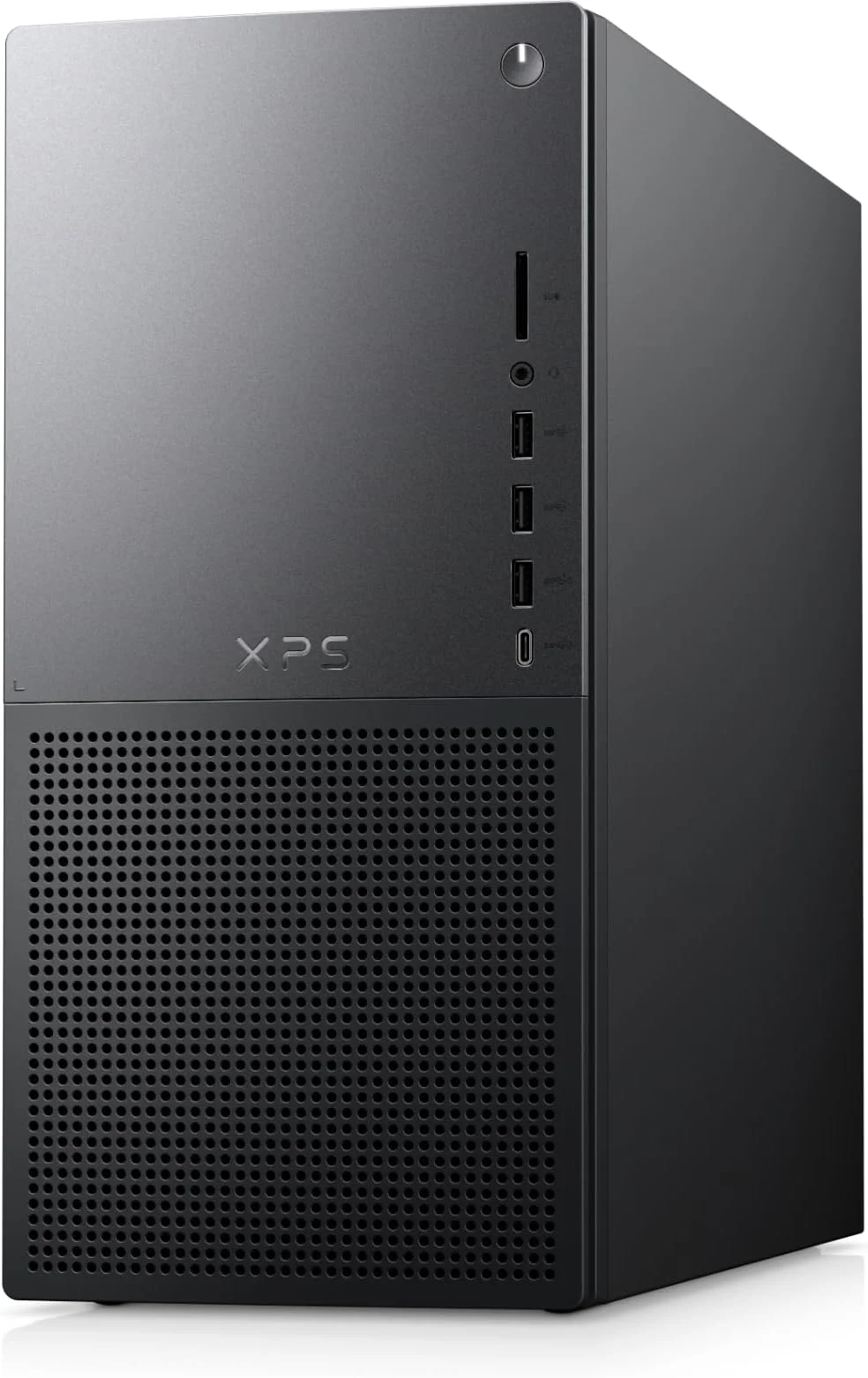
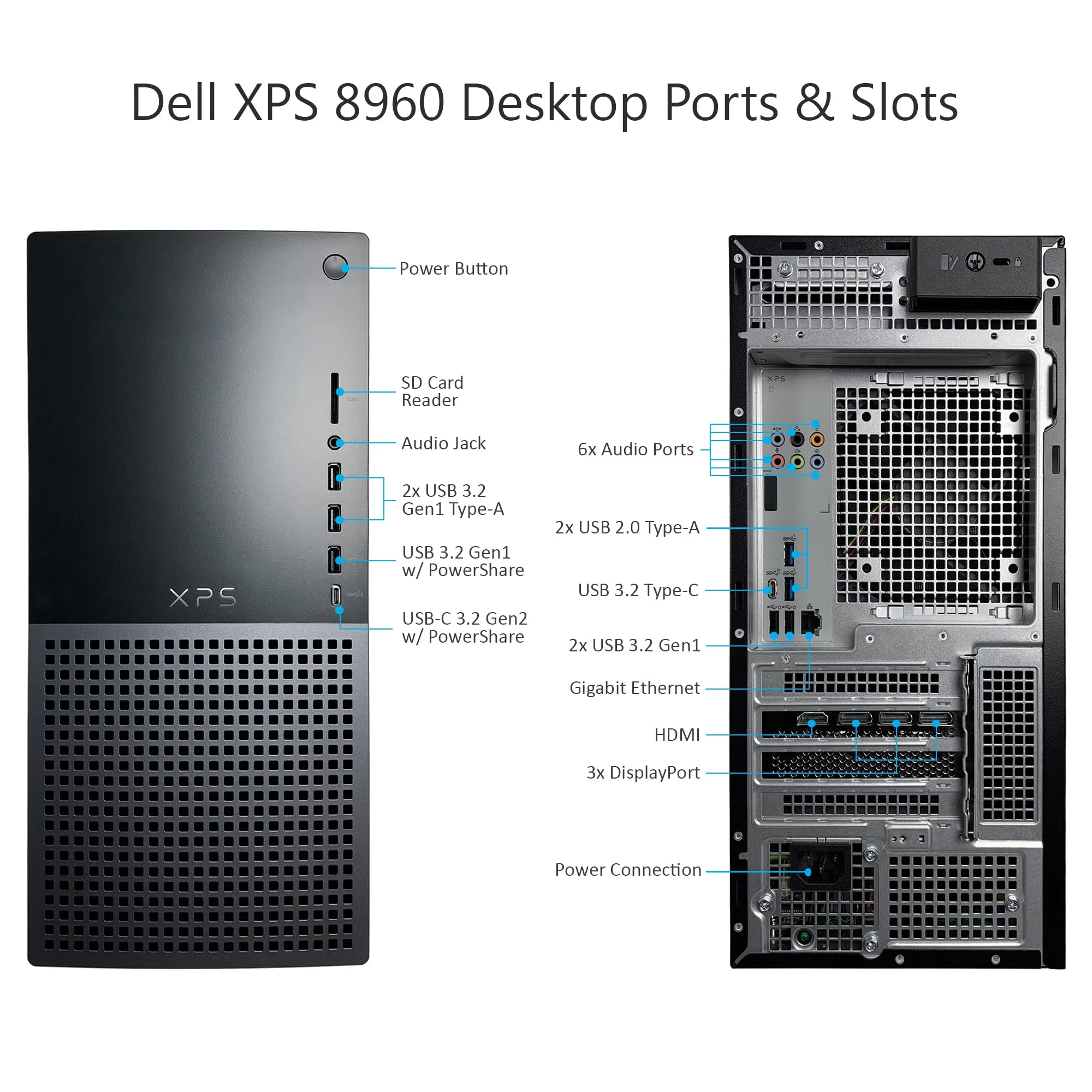
Ergonomics and connectivity are also top-tier. The front I/O panel is thoughtfully positioned near the top lip of the chassis, offering an SD card reader, multiple USB-A ports, a USB-C port, and a headphone jack. This eliminates the need to reach around the back of the machine for daily peripheral connections, underscoring Dell’s commitment to user-centric design in 2026.
Performance
Under the hood, the XPS Desktop 8960 is nothing short of an absolute powerhouse. When equipped with the Intel Core i9-14900K and the massive NVIDIA GeForce RTX 4090, this machine effortlessly crushes both productivity benchmarks and 4K gaming workloads. In our 2026 testing suite, the desktop easily maintained frame rates well over 100 FPS in demanding titles like Cyberpunk 2077 and Alan Wake 2 at maximum settings with path tracing enabled. The DDR5 memory running at 5600 MT/s ensures that multitasking and massive data sets are handled without a hitch.
For creators, the XPS 8960 shines just as brightly. Video rendering in Adobe Premiere Pro and complex 3D modeling in Blender are accelerated significantly by the RTX 4090’s CUDA cores. What is genuinely impressive, however, is the thermal management. Even during sustained multi-core synthetic stress tests like Cinebench R24, the optional liquid cooling solution keeps the CPU temperatures within safe operational limits, rarely throttling down the clock speeds.
Acoustically, the 8960 manages to stay remarkably subdued compared to its competitors. Under typical productivity loads, the fans are practically silent. While they definitely spin up to an audible hum during intense gaming sessions, the sound profile is a low, unobtrusive whoosh rather than a high-pitched whine. This makes the XPS 8960 an excellent choice for users who need peak performance without the distraction of a noisy workstation.
Features & Software
The Dell XPS 8960 ships with Windows 11 and a relatively light footprint of bloatware, though you will find the standard suite of Dell optimization software. The MyDell app and SupportAssist are genuinely useful for keeping drivers up to date, managing power profiles, and running network diagnostics. Dell’s integration of AI-driven optimization in 2026 helps allocate system resources on the fly, ensuring your active applications receive priority processing and bandwidth.
Another standout feature is the robust wireless connectivity. Equipped with Wi-Fi 6E (and optional Wi-Fi 7 on premium configurations), the desktop guarantees ultra-low latency for competitive gaming and rapid cloud syncing. Additionally, the inclusion of a full-sized SD card slot on the front IO—a rarity in many modern cases—is a massive quality-of-life feature for photographers and videographers who frequently transfer large media files.
Value Proposition
Pricing for the Dell XPS Desktop 8960 scales dramatically depending on your chosen configuration. Base models offer an excellent entry point for casual creators, but the top-tier configurations commanding the RTX 4090 push well into premium territory. While you could technically build a similarly specced PC for slightly less money, the XPS premium pays for the comprehensive warranty, impeccable build quality, and guaranteed compatibility out of the box.
For professionals whose time is money, the plug-and-play reliability of the XPS 8960 is easily worth the markup. It serves as a dual-purpose investment—a high-end gaming rig by night and a formidable workstation by day—consolidating the need for multiple machines into one elegant footprint.
How It Compares
When compared to the HP OMEN 45L, the Dell XPS 8960 leans much further into the professional aesthetic. The OMEN boasts a highly unique, separated “Cryo Chamber” for cooling and extensive RGB lighting that appeals to hardcore gamers, but it lacks the understated elegance of the XPS. Internally, both offer similar peak components, though the HP utilizes more standardized ATX parts for slightly better long-term upgradability.
Against the Lenovo Legion Tower 7i, the XPS 8960 holds its ground as a quieter, more compact machine. The Legion is slightly larger and louder under load, but often edges out the Dell in raw gaming benchmarks due to more aggressive factory overclocks. Ultimately, the XPS wins out for creators and professionals, while the Legion remains a purist’s gaming choice.
Pros and Cons
Pros
- Elegant, minimalist design that fits into any home or office environment.
- Exceptional top-tier gaming and productivity performance with up to an RTX 4090.
- Quiet operation and excellent thermal management, even under heavy loads.
- Highly convenient front-panel I/O, including a full-sized SD card reader.
Cons
- Uses a proprietary motherboard and power supply, limiting extensive aftermarket upgrades.
- Top-tier configurations carry a hefty premium over DIY builds.
- The interior layout, while neat, is quite cramped around the massive GPU.
FAQ
Q: Can I upgrade the graphics card in the Dell XPS Desktop 8960 later?
A: Yes, the GPU is a standard PCIe card. However, you must ensure the new card fits within the physical dimensions of the chassis and that your power supply has sufficient wattage to support it.
Q: Does the XPS 8960 come with liquid cooling?
A: Liquid cooling is an optional upgrade on higher-end configurations and is highly recommended if you choose an Intel Core i7 or i9 processor.
Q: Is the memory and storage upgradable?
A: Absolutely. The XPS 8960 features standard DDR5 DIMM slots and multiple M.2 PCIe slots for easily expanding your RAM and storage in the future.
Q: What kind of warranty does Dell provide?
A: Dell offers a standard 1-year hardware warranty, with options to extend up to 4 years of Premium Support which includes on-site repairs and accidental damage protection.
Verdict
The Dell XPS Desktop 8960 is an exceptional choice for creators, professionals, and gamers who want uncompromising power wrapped in a sophisticated, grown-up chassis. While DIY builders might scoff at its proprietary components, those seeking a reliable, high-performance prebuilt will find it hard to beat. If you have the budget in 2026 for a top-tier configuration, this machine will effortlessly handle any task you throw at it for years to come.
Where to Buy
Pros
- ✓ Elegant, minimalist design that fits into any home or office environment.
- ✓ Exceptional top-tier gaming and productivity performance with up to an RTX 4090.
- ✓ Quiet operation and excellent thermal management, even under heavy loads.
- ✓ Highly convenient front-panel I/O, including a full-sized SD card reader.
Cons
- ✗ Uses a proprietary motherboard and power supply, limiting extensive aftermarket upgrades.
- ✗ Top-tier configurations carry a hefty premium over DIY builds.
- ✗ The interior layout, while neat, is quite cramped around the massive GPU.
Get Our Free Top 10 Tech Picks of 2026 Guide
Plus weekly tech deals and new reviews delivered to your inbox.
[cp_email_signup]
No spam. Unsubscribe anytime.
Ready to buy the Dell XPS Desktop 8960?
Affiliate link — we may earn a commission at no extra cost to you.